
DxO FilmPack DxO Film Rendering is a powerful film rendering software, acclaimed by professionals for its faithful analog film renderings. It allows photographers to apply all the characteristics of the analog films that made photographic history to digital images, along with a vast selection of pristine renderings, filters, tones, and visual effects—all infinitely combinable. Directly inherited from DxO's pioneering expertise in optical correction, demosaicing, and noise reduction, it faithfully reproduces the color and grain of analog film. Tracing the history of film photography with 84 highly authentic film effects and more.In addition to supporting X-TransRAW files (Beta), the latest version of DxO FilmPack also introduces new film stocks, film rendering effects, and Fujifilm. The new version includes a large number of new effects and introduces "Time Machine", a unique interactive way to introduce the history of film photography.Friends who need this tool are welcome to download and use it.

DxO FilmPack Advantages Overview
DxO FilmPack applies the saturation, contrast, and grain of the most renowned simulated silver halide, slide, and negative films to your digital images. Choose from up to 45 color and 38 black-and-white analog films to awaken the dormant visual poet in you.
The DxO FilmPack program offers you many original creative effects: choose from 39 color and black and white designer presets. Vintage effects, old photos, magical tones: give your photos a unique style!
You can use DxO FilmPack as a standalone application and as a plug-in for Adobe Photoshop, Adobe Photoshop Elements, Adobe Photoshop Lightroom, Apple Aperture, and DxO PhotoLab. In standalone mode or as a plug-in for DxO PhotoLab, you can directly process TIFF, JPEG, and RAW images with just a few clicks. In plug-in mode, you can follow your regular processing workflow while enriching your Adobe or Apple solution.
New Features
A well-deserved industry leader
DxO FilmPack leverages a proprietary calibration process, perfected in its labs, to recreate the grain and color of legendary film stocks. The software recreates the hue, saturation, contrast, and grain of 84 authentic film stocks, including renowned Kodak Tri-X 400, Polaroid 690, Ilford HPS, and Fujifilm Superia. It also offers an unprecedented glimpse into the advancements in image development and processing technology throughout photography.
"Time Machine": Let the history of photography inspire creativity
DxO FilmPack 7 explores the history of film photography from its inception to the present day, taking users on a true journey through time. The software introduces a new way to display vibrant film renderings, showcasing 14 distinct eras through iconic works and renowned figures from the world of photography. The software explores and documents the story behind each photograph from both a technical and historical perspective, providing users with realistic renderings. Users can apply these renderings directly to their images to recreate similar styles and effects. For example, users can imbue their black-and-white images with the glamour of the 1950s or even the artistic spirit of William Klein.
“We wanted to give DxO FilmPack a deeper layer of depth,” said Jean-Marc Alexia, Vice President of Marketing and Product Strategy. “To document our ‘time machine,’ we partnered with the Friends of the French Museum of Photography in Bièvres, whose president is the highly accomplished photographer Didier Pilon.”
New legendary film rendering
DxO FilmPack enters the modern digital age with 15 new renderings, including two legendary films: Kodak's renowned EKTACHROME Professional Infrared EIR color positive film and IMPOSSIBLE PX 600 SILVER SHADE, the black-and-white instant film for the Polaroid 600 camera; seven Film Simulation modes for the X-Series Fujifilm digital cameras; and six cinematic renderings inspired by the hottest film grades.
Rich creative effects
DxO FilmPack 7 introduces 20 new effects, opening up unprecedented creative possibilities. These include: Water Drops and Wrinkled Paper, designed to give images a vintage look; 15 new Light Leaks, such as Flare, Fog, and Zoom, to add subtle color effects to your images; and 15 new Frames, including Matte, Black, and Film Frames, to transform your images into works of art with unique looks.
Comprehensive eight-channel HSL settings and fully customizable split toning
A new eight-channel color rendering engine replaces the previous six-channel engine, providing users with more precise color control. Users can also select their favorite hues in the highlights and shadows of the image and combine different colors to achieve subtle and realistic split toning effects.
Technical details and system requirements
Supported operating systems: Windows 7/8/10/11
Processor: Intel Core 2 Duo, AMD Athlon 64 X2 or higher
RAM: 2 GB RAM (4 GB recommended)
Free Hard Drive Space: 400 MB or more of available hard drive space
Features
1. RAW format support
DxO FilmPack now supports RAW formats, using calibration data from the camera to apply simulation presets with completely faithful colors. Based on DxO's proprietary RAW processing technology, DxO FilmPack automatically corrects (without any intervention) all potential optical defects of the device: distortion, vignetting, and chromatic aberration, while effectively reducing unwanted noise in digital images.
2. More than 80 high-fidelity analog film renderings
DxO FilmPack preset renderings are created in DxO's labs using a unique scientific process that exhaustively analyzes each film. This process is based on a series of specially calibrated target shots and real-life subjects shot with the analyzed films. The films are then processed by the world's most renowned labs (notably PICTO and Arka in France and Duggal in the United States) and digitized at high resolution to measure the film response and extract the grain matrix. This process allows DxO to perfectly reproduce the character, color, and grain of 83 legendary film stocks—color negative, black and white, positive, and instant films—with high-fidelity renderings.
3. Fujifilm and Film Digital Rendering
DxO FilmPack also offers preset renderings such as digital simulations of certain analog films available on Fujifilm cameras, while giving your images a cinematic look.
4. Ergonomically designed interface
With DxO FilmPack's new, simpler and more intuitive interface, processing your images has never been easier! Use the integrated file browser to select a working directory and instantly see all the images it contains. Quickly access all the presets, effects, and settings grouped together in a unique horizontal control panel. Choose the look that best suits your aesthetic: analog film, cinematic, or designer, in color or black and white, with or without toning effects or borders—the combinations are endless! Click a thumbnail: instantly apply the processing.
5. Designer Presets: Add Personality to Your Images
DxO FilmPack offers a wealth of original creative presets: up to 39 designer presets in color and black and white. Vintage effects, old photos, and vintage tones: give your photos a unique style. Recreate the warm tones and past colors of vintage Americana with the Poetic preset. Warm up colors with red tones to capture the evening light. Use Photo 1900 to recreate a gentle sepia enhanced by fine grain.
6. Original effect: highlight photos
Easily apply a wide range of effects to your images with one-click settings. Use the Texture tool to choose from a variety of textures—scratches, stains, grain, or wrinkled paper—to add a vintage look to your photos. Fine-tune the intensity and direction of the effect, then apply it to the color tone using DxO FilmPack's intuitive controls. Use the Light Leaks tool panel to simulate accidental exposure of film cartridges to light and reproduce overexposed or color-saturated areas at the edges of your image.
Choose the type of effect you want to apply, its direction, intensity, and change its position as needed. DxO FilmPack offers around 20 types of frames: Picture Frame, Darkroom, Slide, Instant, Film, Glass, or Old Paper. Determine their position (inside or outside the image) and thickness to showcase your photo.
7. Plugins and standalone applications
You can use DxO FilmPack as a standalone application or as a plug-in for Adobe Photoshop, Adobe Photoshop Elements, Adobe Lightroom Classic, and DxO OpticsPro. In standalone mode or as a plug-in for DxO OpticsPro, you can directly process TIFF, JPEG, and RAW images with just a few clicks. In plug-in mode, you can perform your regular processing workflow while enriching your Adobe solution.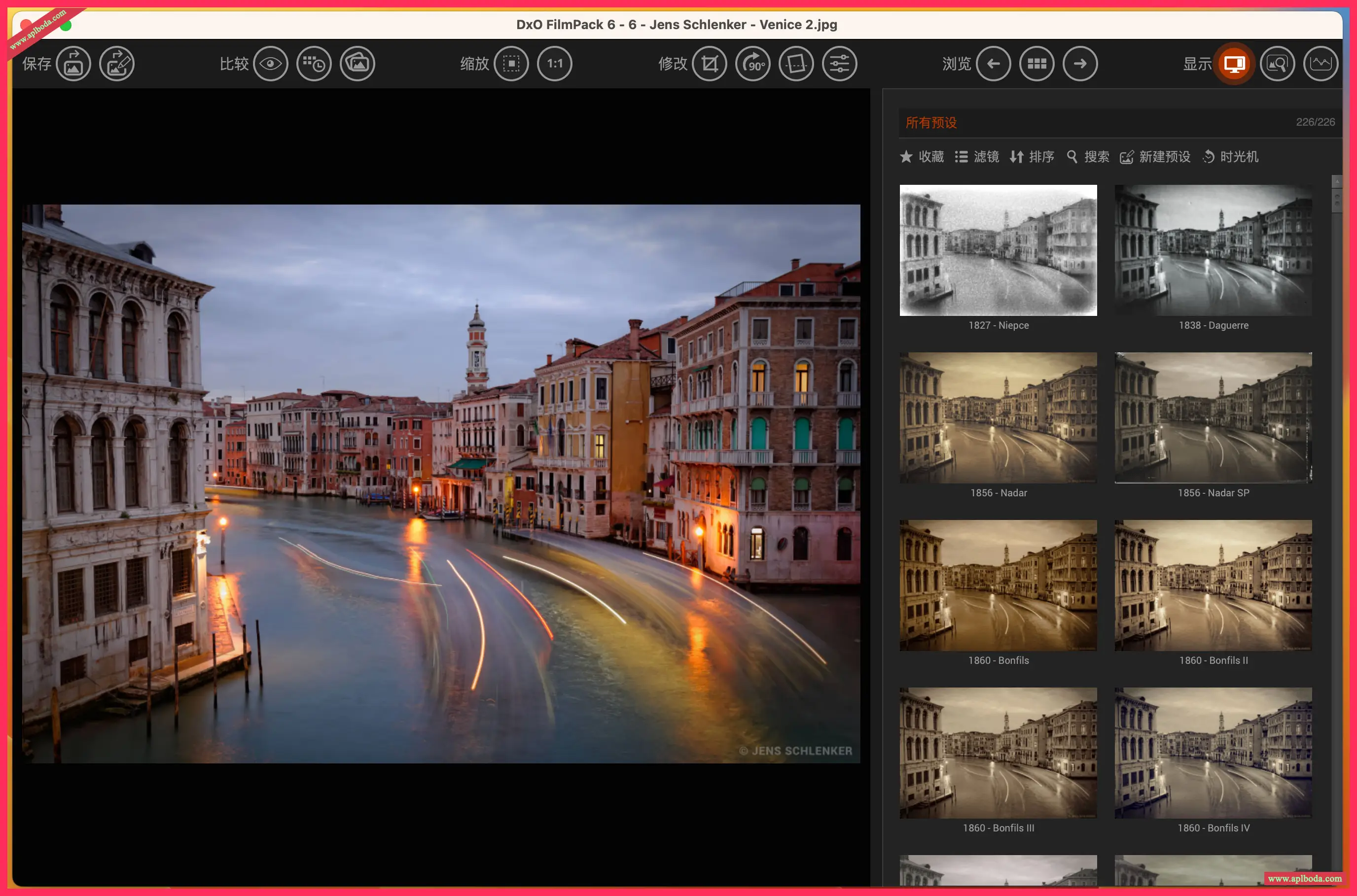

 English
  简体中文
简体中文  香港中文
香港中文  繁體中文
繁體中文  Deutsch