
VideoDuke for MacIt allows you to save video content such as music, movies, TV shows, cartoons, etc. from any video hosting site (such as Vimeo, YouTube, Dailymotion, and even social media like Facebook) to your Mac, setting the desired video format (3GP, MP4, M4V, FLV) and resolution (144p, 360p, HD 720p, HD 1080p, etc.).

A clean interface and advanced features make VideoDuke one of the best video downloaders available for Mac. VideoDuke offers support for all top video sites like YouTube, Twitch, Tumblr, and more, and features quick access buttons that allow you to find the video you need in just a few easy steps using the built-in search tool.
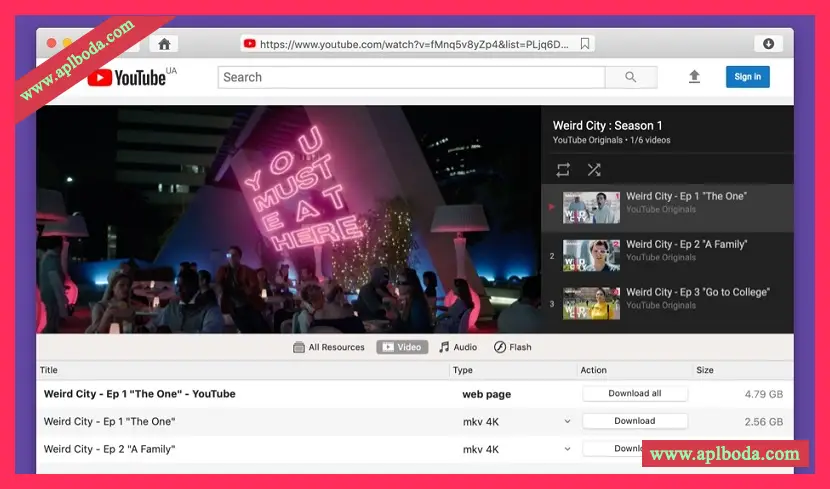
Download YouTube videos using VideoDuke
Download YouTube playlists
Saving entire playlists from YouTube on your Mac is easy with this video downloader for Mac. Just play the first playlist track and the rest will be loaded by VideoDuke. You can set the video quality for each individual playlist item.
Download 4K, 5K, and 8K videos
You can download any video and set the desired video format and quality for each downloaded video according to your needs, such as the device you want to play the file on, etc.
Lower resolutions (such as 1080p, 720p, 480p, 360p, 240p, or 144p) are better suited for playback on mobile devices, while higher quality resolutions like 2K, 4K, 5K, and 8K are best suited for larger desktop displays.
Download entire YouTube channel
What makes VideoDuke a more powerful video downloading app is the option to download entire YouTube channels to your macOS device (open the Videos tab to do this).
Download audio file
If you only need to extract the audio from a YouTube clip instead of downloading the entire video, VideoDuke will save the MP3 audio file for you quickly and easily.
Download music on Mac:
VideoDuke can extract the audio track from any video found on supported websites. You can use this feature in the following ways:
Download MP3 file
VideoDuke's advanced mode lets you see all available download sources (like Bandcamp) right on the page – and easily download them to your Mac.
Convert video to audio
If you don't need to download videos from sites like YouTube and you only need the audio track, then you can use an MP4 to MP3 converter. To do this, go to the Audio tab in the VideoDuke interface to quickly and easily save MP3 audio files from YouTube.
Extract audio from video
In advanced mode, VideoDuke will display all available download items on the page. You can extract audio from your favorite YouTube videos in a few simple steps.
The best music downloader
We're proud to rank VideoDuke among the best modern music download apps due to its impressive ability to download videos and music. Don't forget it's also one of the best video downloaders for Mac.
Version 2.10 Update Content:
Fixed an issue with downloading videos from Dailymotion.
Fixed an issue with downloading videos from TikTok.
Fixed issues opening certain Reddit pages.
Fixed an issue with downloading videos from YouTube channels.
Many other fixes and improvements

 English
  简体中文
简体中文  香港中文
香港中文  繁體中文
繁體中文  Deutsch